Skip to content

Payroll, HR and workforce software for UK businesses

Your team, connected from rota to payroll.

Plan shifts, manage your people and turn approved hours into payroll inputs—all in one place.

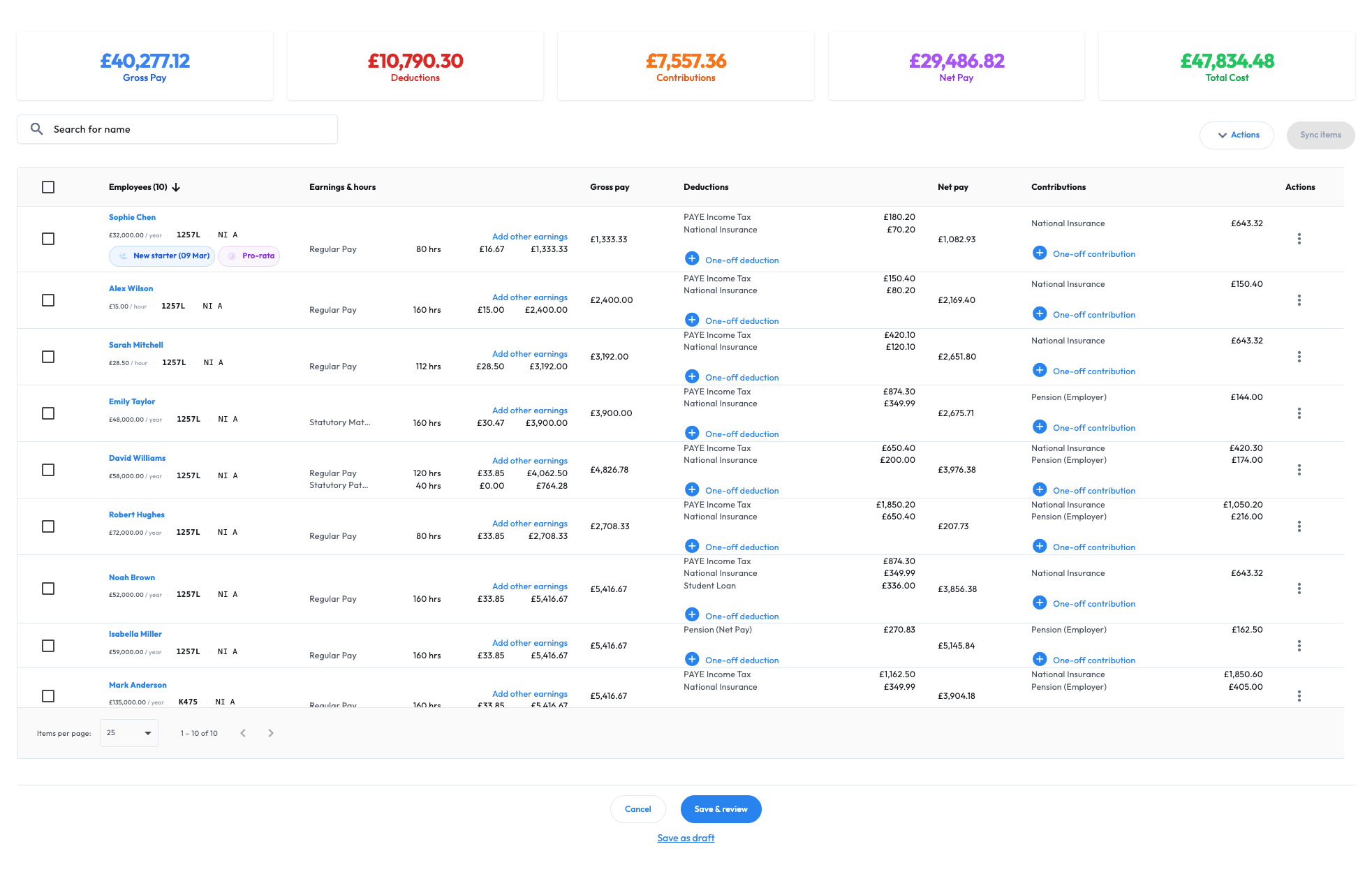
Workmax payroll overview showing employee hours and earnings, gross pay, deductions, net pay and employer contributions in an example pay run.
Scroll sideways to read the capture.Workmax payroll overview · example data · Open full-size capture (new tab)
  1. Plan the week
    Five shifts. One clear plan.
    MonTueWedThuFri

    37.5 hours planned

  2. Approve the hours
    37.5 hours

    Reviewed and approved

  3. Annual leaveRequest approved

    Time off, kept in view.

  4. Prepare the payReady for payroll

    Approved hours, ready to check.

Spend less time rebuilding the week across separate systems.

The Workmax platform

People, rotas and pay. Working together.

Four everyday jobs, connected in one platform. Choose the tools your business needs.

UK payroll

A clearer path to payday.

Bring approved hours into pay. Review earnings, produce payslips and manage pensions and HMRC submissions.

Explore payroll

A café worker in an apron using a laptop at the counter.
Example regular earnings£543.75
37.5 hours
× £14.50
Fictional earnings example

HR and people

People first. Paperwork together.

Keep staff records, documents and job details in one place.

Explore HR

Two colleagues talking through work together at a laptop in a bright office.

Scheduling

A week your team can follow.

Build rotas, assign shifts and see where you need cover.

Explore scheduling

Three colleagues planning together around a tablet.
Example rota20–24 Apr
Aisha Khan09:00–16:30 · Mon–Fri
  • Mon7.5h
  • Tue7.5h
  • Wed7.5h
  • Thu7.5h
  • Fri7.5h

Time tracking

Hours checked.
Next step clear.

Give managers a clear place to review recorded hours and approve them for payroll.

Explore time tracking

A café employee smiling as she uses her phone at work.
Example time entry
Aisha KhanWed 22 Apr
7.5hours09:00–16:30
Approved

A working week in Workmax

Review the hours. Prepare the pay.

Follow Aisha’s week from planned shifts to reviewed hours, then explore how earnings are checked in Workmax.

Aisha Khan · Operations20–24 April 2026
37.5 hours · £14.50 per hour
Fictional demonstration

Aisha’s working week

The week starts with a clear plan.

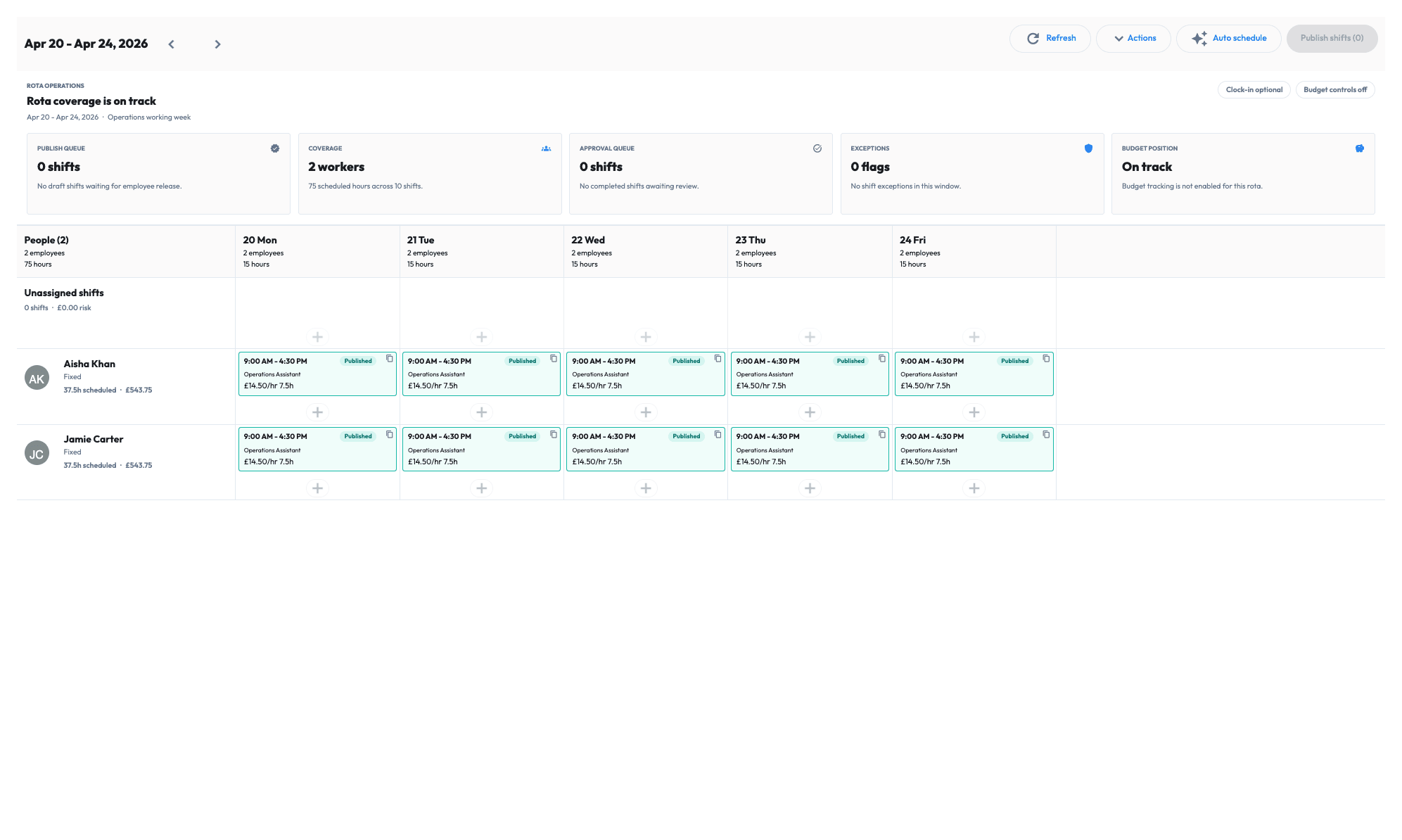
Five shifts, 7.5 hours each. See Aisha’s working week alongside the team, before those hours reach payroll.

Actual Workmax rota · fictional data
Aisha Khan · Operations

Workmax Operations rota for 20–24 April, with Aisha Khan and Jamie Carter scheduled for five 7.5-hour shifts each, 09:00–16:30.
Scroll sideways to read the capture.The planned week · actual product capture · Open full-size capture (new tab)
37.5 hoursFive shifts. One working week.

Aisha’s rota and timesheet follow the same fictional working week. The payroll overview shows a separate example pay run.

Explore Workmax

Payroll, people and the work in between.

The tools to pay your team, manage your people and keep the working week on track. Explore what fits your business.

Scroll to explore all 12 features.

A smiling business owner working at her laptop while speaking on the phone.

Assisted onboarding

Your first payroll starts with a helping hand.

Moving systems is a big step. We help prepare your data, check your setup and get your first Workmax payroll ready for your review.

  1. Prepare your data

    Plan the handover and employee imports together.

  2. Review your setup

    Check opening and year-to-date figures, then prepare the first run.

  3. Approve your first payroll

    Your team reviews the figures and approves what goes live.

How assisted migration works ↗

The work and timing depend on your current system, records and agreed scope.

Getting to know Workmax

Your questions,
answered.

From choosing your tools to running your first payroll. Here’s what to know before you get started.

Have a question about your business?

Tell us how your team works. We’ll walk through the options with you.

Talk to the Workmax team
Can I start with payroll, or do I need everything?
You can start with Payroll and the HR records it uses, then add the tools your team needs. Scheduling and Time Tracking are separate modules. Your quote will explain what’s included and any module dependencies.
How do rotas and worked hours connect to payroll?
With Scheduling, Time Tracking and Payroll enabled, you can plan shifts, review recorded hours and approve the hours that go into payroll preparation. Your team checks earnings before completing the pay run. See the working-week example.
How much will Workmax cost for my team?
Your price depends on the modules you choose and the people covered, plus the workspace fee. Explore pricing to see your options. Your quote confirms the billable people, module dependencies and billing terms before you start.
Can you help us switch from our current system?
Yes. We help with employee imports, opening and year-to-date checks, and first-run preparation. Your team reviews the figures and approves what goes live. The scope and timing depend on your records and current system. See how assisted migration works.
Can I explore Workmax before making a decision?
Yes. Request a demo tailored to your team, or request payroll sandbox access to explore with example data. You can also create an account to get started.
Is Workmax just for care providers?
No. Payroll, HR, scheduling and time tracking support UK businesses across industries. Care providers can also use specialist care planning and visit-verification tools. Explore Workmax for care.

Let’s make the handoffs clearer

See how your rota, hours and payroll fit together.

A guided demo around your team, your processes and the tools you need.