
Holiday admin often looks harmless until the team grows past the point where one spreadsheet can hold everything together.
Then the problems start piling up:
- duplicate requests land through email and chat;
- managers approve leave without seeing clashes;
- balances get updated late;
- payroll finds out about unpaid leave too close to the cut-off;
- employees keep asking how much leave they have left.
That is the moment holiday tracking stops being “simple admin” and starts becoming a repetitive coordination problem.
For small businesses, the answer is not a complicated leave policy document. It is a cleaner workflow from request to approval to payroll handoff.
What the workflow needs to solve
A working holiday request process should make five things easy:
- staff can submit requests in one place;
- managers can see availability before deciding;
- overlapping absence becomes visible early;
- balances update consistently;
- payroll gets the right information when leave affects pay.
If one of those still depends on manual re-entry, the system will keep leaking admin time.
Manual workflow versus cleaner workflow
In a manual process:
- An employee messages their manager.
- The manager says yes.
- Somebody later updates the spreadsheet.
- Another person checks entitlement.
- Payroll may or may not hear about any unpaid leave in time.
In a cleaner workflow:
- The employee submits the request in one place.
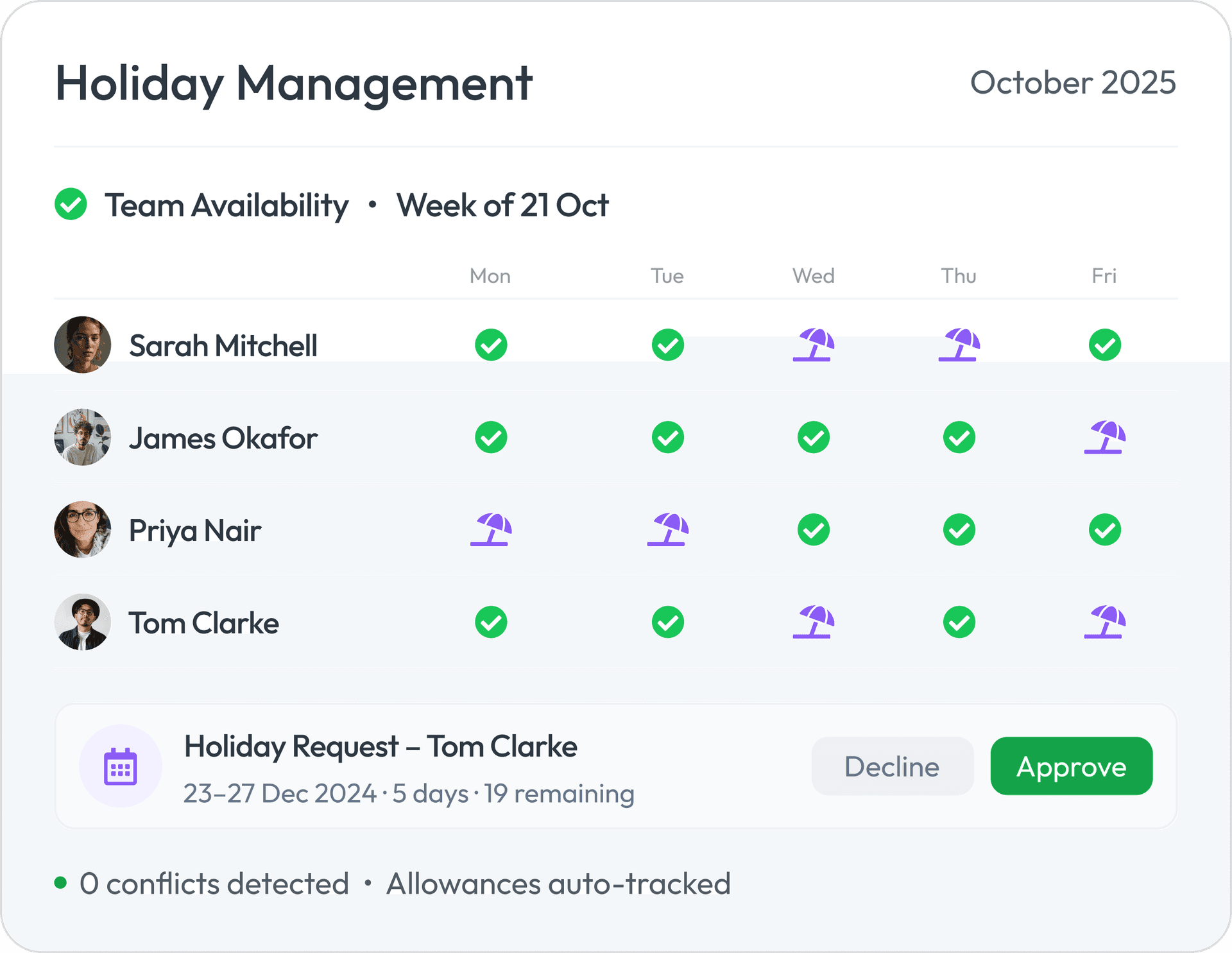
- The manager sees team availability and clash risk before approving.
- The balance updates inside the employee record.
- The approved leave is visible to the team that needs it.
- Payroll sees the outcome if the leave affects pay.
That is what “automation” should mean here. Fewer disconnected steps, not more software for the sake of it.
Step 1: Standardise how requests are submitted
If requests arrive through email, WhatsApp, verbal approval, and sticky notes, the workflow is already broken.
Every request should include the same basics:
- dates requested;
- partial or full day where relevant;
- reason category if your policy uses one;
- employee making the request.
The goal is not bureaucracy. It is removing rekeying and ambiguity.
Step 2: Give managers visibility before they approve
The approval step is where spreadsheet systems usually create the most frustration.
Managers need to see:
- who else is already off;
- whether the request creates an operational gap;
- whether the employee has enough allowance left;
- whether the absence might affect pay.
Without that visibility, approval becomes guesswork followed by cleanup.
Step 3: Let balances update from the same workflow
One of the most common admin drains is the “approved but not updated” gap.
The request is approved, but the balance spreadsheet stays wrong until someone remembers. That creates:
- employees asking for their remaining leave again;
- duplicate checks by HR or finance;
- disputes about what was already booked.
A cleaner workflow updates the record when the request moves status.
Step 4: Separate approval from payroll impact
Not every leave decision affects payroll. But when it does, the handoff matters.
That is especially true for:
- unpaid leave;
- holiday during notice periods;
- leavers with remaining balance issues;
- absence patterns that interact with statutory pay or deductions.
The HR workflow should not force payroll to reconstruct leave decisions from chats or exported spreadsheets.
Step 5: Keep the team view simple
Holiday workflow gets noisy when different people hold different versions of the truth.
You want one visible answer to:
- who is off;
- what is pending;
- what is approved;
- what the balance is now.
That cuts follow-up questions as much as it cuts admin.
Worked example
A 30-person business manages leave through a shared spreadsheet and line-manager emails. During summer, two overlapping approvals are granted in different conversations, one unpaid leave request is not passed to payroll until after the pay cut-off, and employees keep checking balances manually.
In the cleaner workflow:
- requests are submitted through one leave workflow;
- managers see team availability before approving;
- balances update when the request is approved;
- unpaid leave is visible to payroll in time for the correct run;
- staff can check their own status and remaining allowance without asking HR.
The process is not just faster. It is quieter.
Common mistakes
- Letting leave requests start in different channels.
- Approving time off without seeing team clashes.
- Updating balances manually after the decision.
- Treating payroll as an afterthought when leave affects pay.
- Assuming the spreadsheet is current because nobody has complained yet.
Why this is an HR burnout issue
Holiday admin rarely feels urgent one request at a time. The burnout comes from repetition:
- checking balances over and over;
- resolving clashes late;
- correcting missed updates;
- answering the same leave questions repeatedly.
A better workflow reduces interruptions, not just admin minutes.
How Workmax helps
Workmax helps UK employers keep leave requests, approvals, employee balances, team visibility, and payroll handoff in one workflow so holiday management stops depending on spreadsheets and inbox memory.
If leave admin is creating noise across managers, HR, and payroll, start with HR software for UK employers. If leave later affects final pay or notice handling, pair it with the holiday during notice period guide and the holiday pay calculator.