Skip to content

CARE COMPLIANCE SOFTWARE · ENGLAND

See every workforce compliance gap before it becomes operational risk

Turn organisational training rules, safer-recruitment checks, evidence, reminders and workforce actions into one visible compliance workflow for care providers in England.

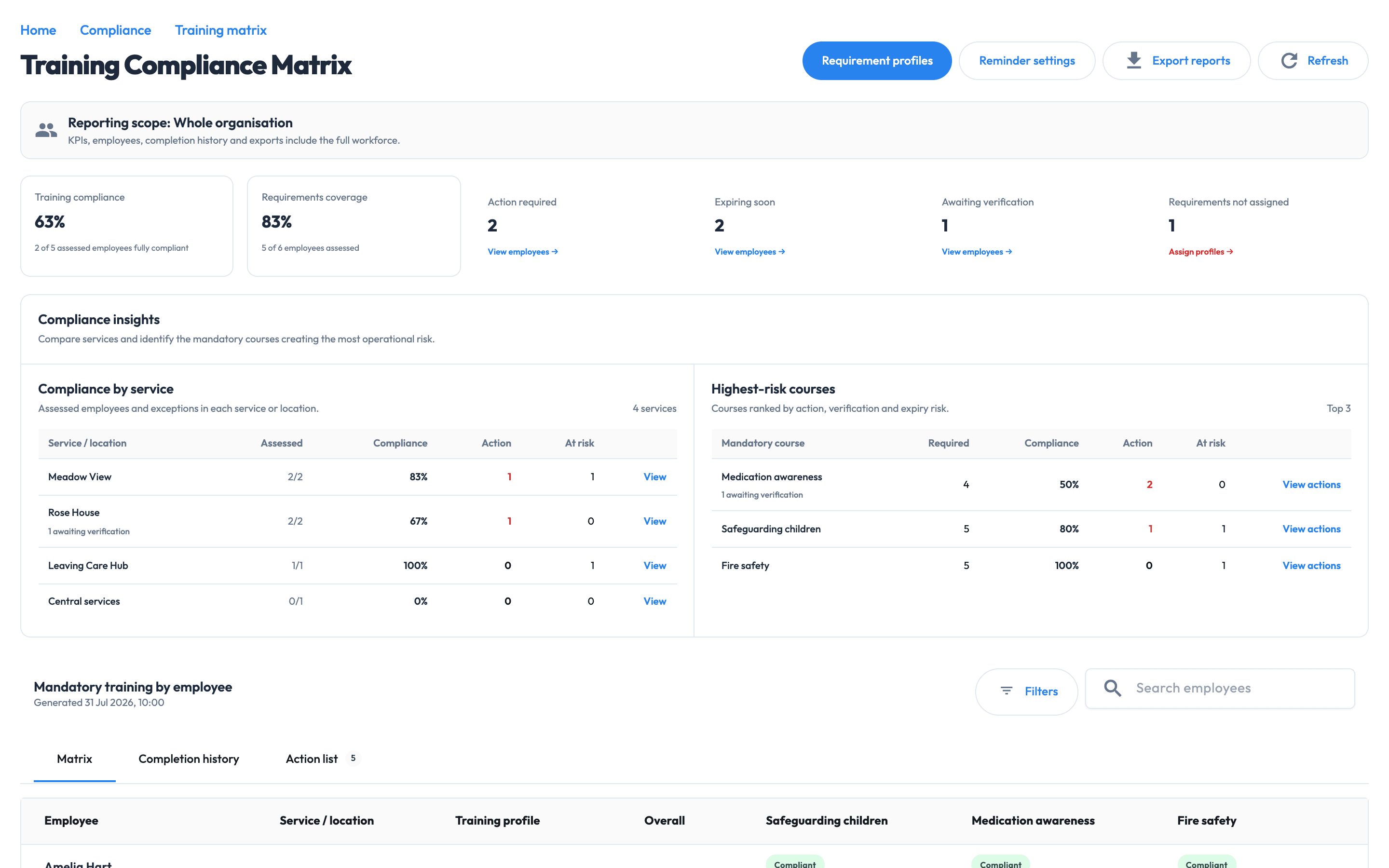
Workmax training compliance matrix showing multi-site workforce requirements and action states
Workforce compliance · example data · Open full-size image (new tab)
  • 2 need action

    See which records need follow-up

  • 2 expiring soon

    Review upcoming renewal needs

  • 1 awaiting verification

    Submitted evidence needs review

01 · REQUIREMENTS BY CONTEXT

Know what each employee needs.

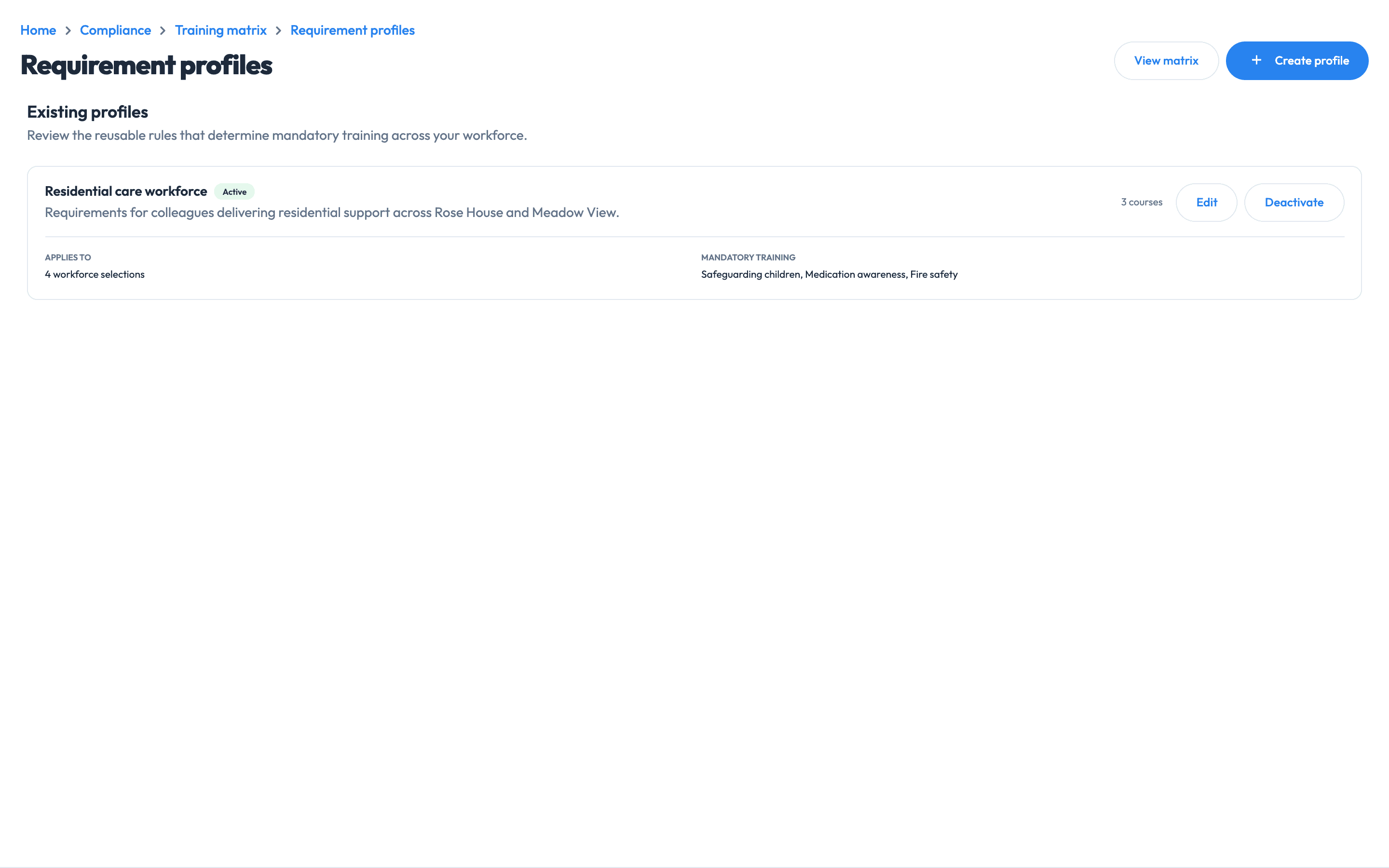
Assign reusable requirement profiles by service, location, department, role or individual. Keep the reason for each requirement alongside its rules.

  • Target the right people. Use services or locations, departments, job roles and named employees.
  • Record the rationale. Keep policy, regulator, legislation, commissioner, insurer or risk-assessment context with the requirement.
  • Review it deliberately. Add effective dates, review dates, approvers and references to support organisational governance.
Validity, refreshers and requirement rules
  • Location, department, job-role and individual assignment
  • Completion windows, validity periods and refresher rules
  • Evidence and verification requirements
  • Care-sector catalogue guidance with applicability notes

Care-sector catalogue guidance is a starting point to review against your organisation’s services and policies.

Workmax active requirement profiles for different care-service groups
Know what each employee needs. · example data · Open full-size image (new tab)

02 · TRAINING LIFECYCLE

See what’s missing, expiring or awaiting review.

Review the workforce matrix across services and courses, then focus on the records needing attention. Submitted evidence, verified evidence and a current record tell you different things.

  • Required. The organisation has assigned the requirement through a profile.
  • Evidence submitted. Evidence is available and waiting for an authorised review.
  • Verified. An authorised reviewer has accepted the evidence.
  • Current. The accepted record remains inside its configured validity period.
Safer-recruitment checks and service reporting

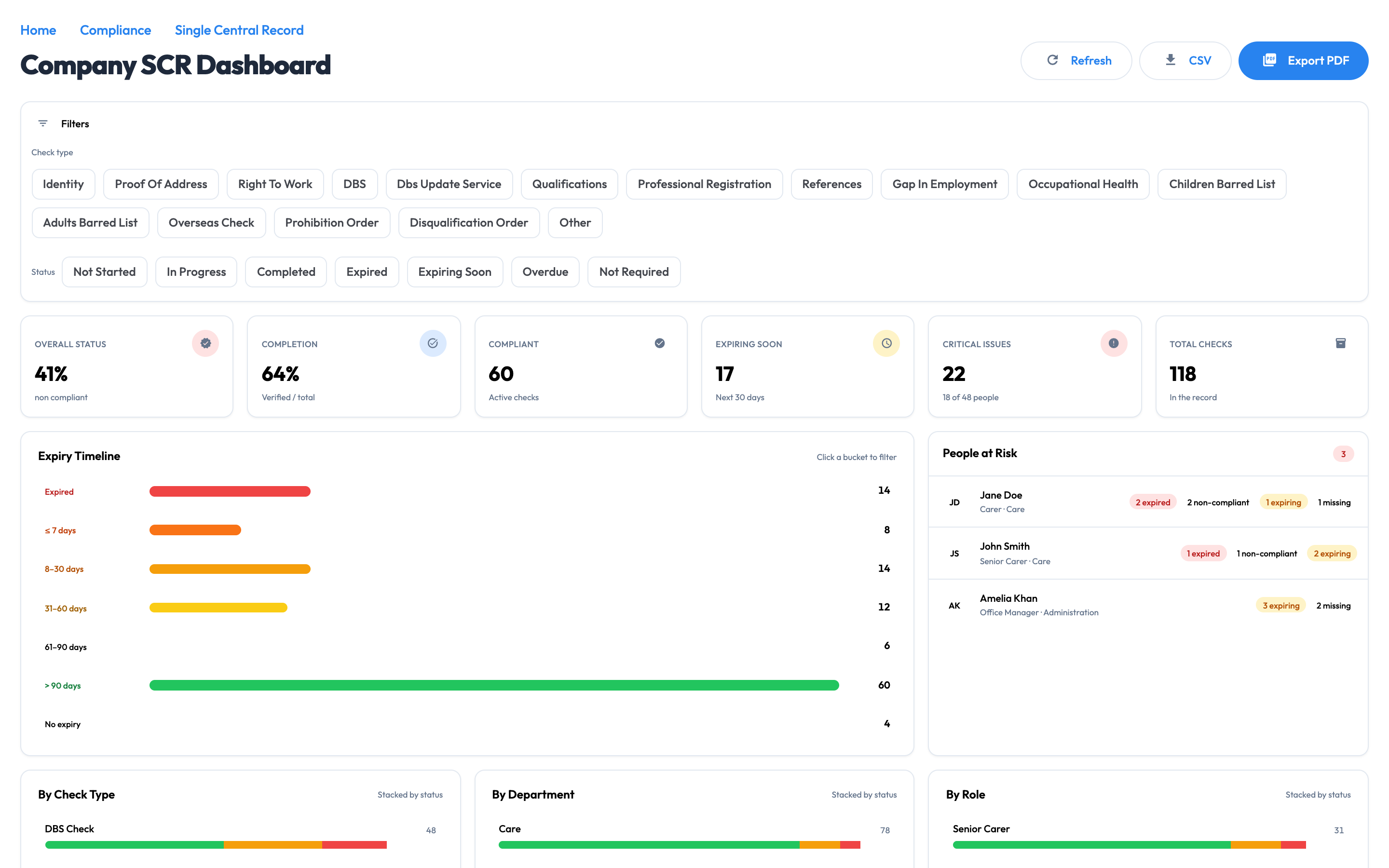
Use a central safer-recruitment view for workforce checks, including an SCR-style record where required by the service. CQC and Ofsted terminology on this page is specific to England.

  • Central check visibility. Review recorded DBS, identity, right-to-work, reference and related check states.
  • Expiry and follow-up context. Surface dates and actions without claiming the underlying check has been independently authenticated by Workmax.
  • England-focused language. Use CQC, Ofsted and SCR terminology only where it matches the relevant service and framework.
View the safer-recruitment screen ↗

Compare service and course coverage with manager views restricted to the permitted workforce scope.

Workmax matrix with current, overdue, expiring and awaiting-verification training states
See what’s missing, expiring or awaiting review. · example data · Open full-size image (new tab)

03 · ACTION AND REPORTING

Follow up and keep a clear decision history.

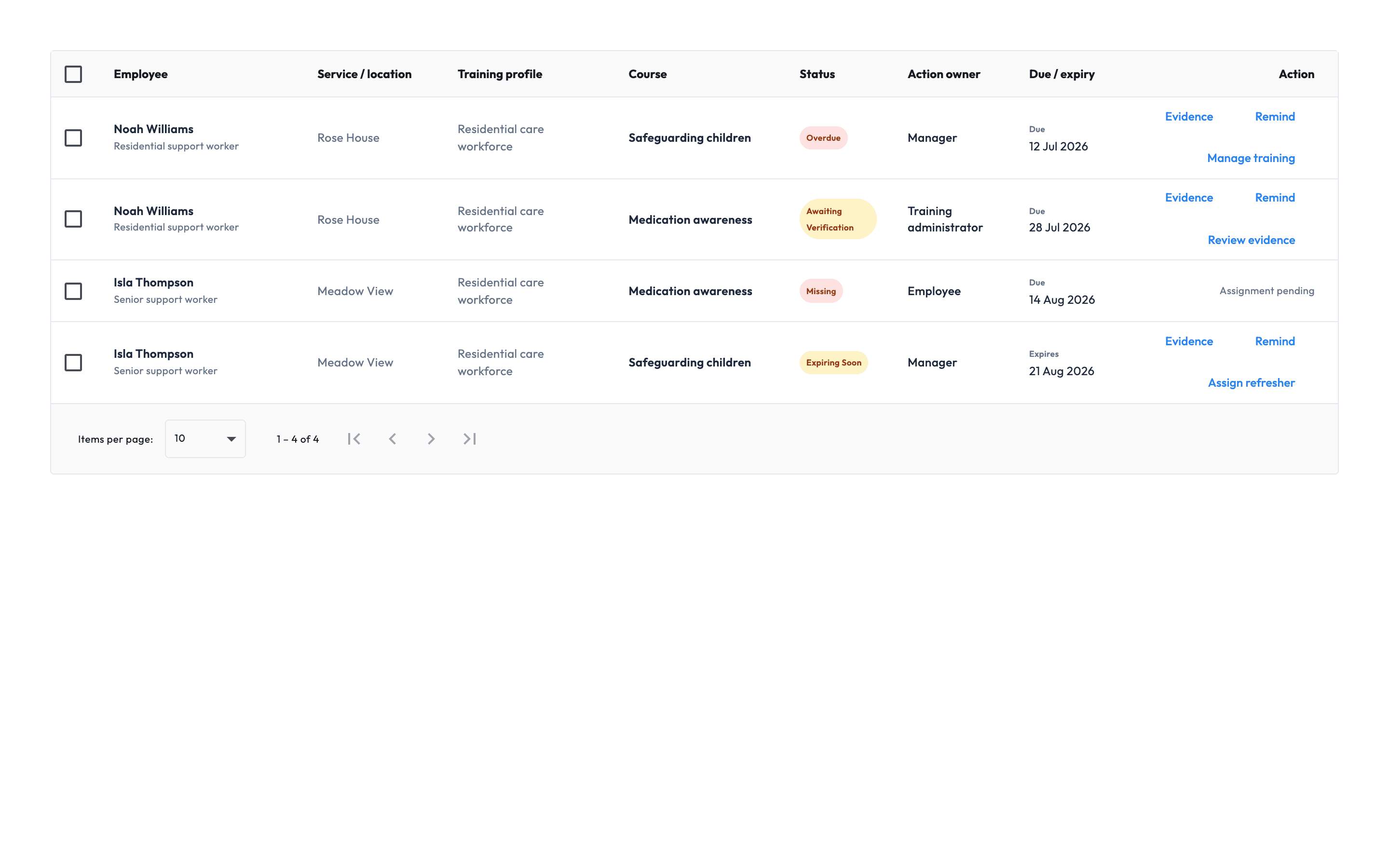
Give each unresolved item an owner, deadline, reason and evidence route, then export the current record for authorised review.

  • Reminders with history. See when reminders were sent, by whom and to which recipient types.
  • Verification decisions. Record approval or rejection with the authorised reviewer, date and reason.
  • Supported adjustments. Record and revoke exemptions or equivalent training with reasons and dates.
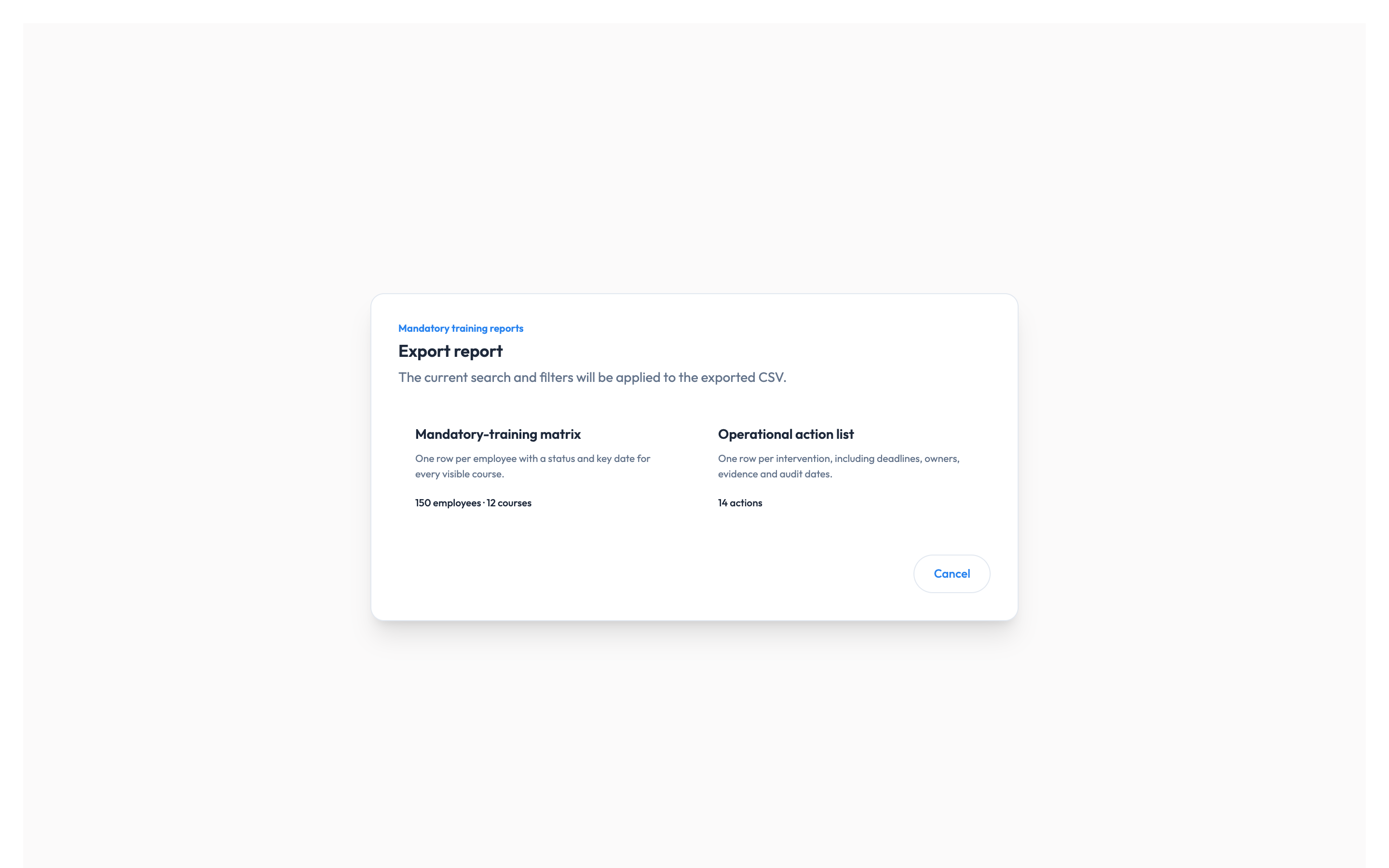
  • Current operational exports. Export matrix, action and completion views without claiming historic profile snapshots that are not retained.
Action ownership and current exports
  • Employee, manager and administrator action ownership
  • Due, expiry and manual reminder history
  • Evidence verification and rejection reasons
  • Exemptions and equivalent-training adjustments

Export the current matrix, action list and completion history for your selected workforce scope. Historical requirement-profile definitions and every previous evidence version are not retained.

View report export options ↗
Workmax action list showing employees, owners, statuses and deadlines
Follow up and keep a clear decision history. · example data · Open full-size image (new tab)

Controls and evidence

Clear access. Traceable evidence. Accountable decisions.

Workmax tracks requirements and evidence; an authorised person decides suitability and deployment. It does not authenticate uploaded documents or perform the underlying statutory check.

Access matched to responsibility

Authorised administrators manage requirement profiles. Managers see workforce information within their permitted scope.

A record of who did what

Verification, rejection, reminders, completion and supported adjustments retain the available actor, date and reason context.

Keep the evidence you need

Record the authorised outcome and dates where that meets your policy, without storing an unnecessary full check document.

Connected to your HR record.

HR supplies the employee, role, department, manager and document context. Training requirements, evidence and refresher workflows are included with Compliance. Onboarding and Scheduling remain optional.

Explore Workmax HR ↗
HR + Compliance pricing

£25 per workspace per month + £5 per active user.

Compliance requires Workmax HR. Your estimate includes the workspace fee, HR and Compliance for the active users selected.

A person whose Workmax account remains active and has the relevant module enabled during the billing month. Additions are prorated from activation; deactivated users stop billing from the next billing period.

10 active users

£75/month + VAT

£25 platform fee + £50 user charges

25 active users

£150/month + VAT

£25 platform fee + £125 user charges

Included with HR + Compliance

✓Requirement profiles and workforce matrices
✓Safer-recruitment check oversight
✓Evidence review, reminders and action queues
✓Current matrix, action and completion-history exports

30-day standard trial · No setup fee · Monthly billing · Month-to-month with 30 days' notice

Training requirements, evidence and refresher workflows are included. Payroll, Scheduling and other modules are optional and priced separately.

Start with one service, then expand.

Agree your requirements and owners, prepare the active workforce records, and test assignment, reminders and evidence review with authorised users.

What to prepare for setup
  • Agree the requirement model. Confirm services, locations, departments, roles, courses, checks, owners, validity periods and evidence rules.
  • Prepare active workforce records. Import or review active people, reporting lines and the current evidence your organisation chooses to retain.
  • Test one service end to end. Validate assignment, reminders, evidence review, adjustments, manager scope and exports with authorised users.

Compliance questions

Compliance software questions from care providers

Pricing, scope and responsibility questions from care providers in England.

What does Workmax Compliance include?
The module includes organisational training requirement profiles, workforce matrices, safer-recruitment check oversight, reminders, evidence review, action queues, supported compliance adjustments and current operational exports.
Does every worker need the same training?
No. Your organisation defines what applies using services or locations, departments, job roles and specific employees. Reusable care-sector catalogue entries are guidance and must be reviewed against your services, policies and current requirements.
What does required, submitted, verified and current mean?
Required means your organisation assigned the requirement. Submitted means evidence is awaiting review. Verified means an authorised user accepted it. Current means the accepted record remains within its configured validity period.
Can Workmax maintain a Single Central Record?
Workmax provides central safer-recruitment and statutory-check oversight, including an SCR-style view where a service in England requires that record. Your organisation remains responsible for deciding the correct framework, checks and evidence.
Does Workmax authenticate DBS or other uploaded documents?
No. Workmax can record information, dates, evidence and an authorised review decision. It does not independently authenticate an uploaded document or perform the underlying statutory check.
Can managers see the whole organisation?
Administrator and manager experiences are different. Manager reporting can be restricted to the workforce within the manager’s permitted scope.
What history is available?
Available records include verification and rejection events, reminders, completion and archive history, and supported exemption or equivalent-training adjustments. Workmax does not currently claim to retain every historic requirement-profile definition or every previous evidence version.
How is an active Compliance user counted?
An active user is a person whose Workmax account remains active and has Compliance enabled during the billing month. Managers and administrators count when enabled. Additions are prorated; deactivated users stop billing from the next billing period.
Does Compliance require another Workmax module?
Yes. Compliance requires Workmax HR because its requirements, evidence and actions depend on the active employee, role, department, manager and document record. Payroll, Scheduling and other modules remain optional.
Does Workmax decide whether someone can work?
No. Workmax exposes configured requirements, available evidence and unresolved risk. An authorised manager remains responsible for deciding suitability and deployment.

See Workmax in action

See your compliance workflow in one place.

Explore requirement profiles, evidence review and the action queue in a focused demo.